Instant Apps are truly a scary thing.
Out of boredom, I clicked on Dream Blast by Angry Birds for a trial. After a few minutes of playing, I found it interesting and downloaded the 70MB full version. And just like that, a few hours passed by…
Mobile games, you know, are captivating at the start but always push for in-app purchases later. While I support legitimate purchases, in-app purchases are not exactly likable. This game also has in-app purchase verification over the internet. After some thought, why not just modify the save file? After several attempts, I located the game save file at sdcard/Android/data/com.ro**o.dream/files/users/[userid]/prefs.json. Upon opening it, I found that the .json file was full of gibberish. Alright, time to hunt for the encryption algorithm.

Restoring IL2CPP
After unpacking the game and taking a look, the classes.dex contained mostly irrelevant stuff. The game logic was likely written in Unity code. I searched but couldn’t find Unity’s .NET binary file assets/bin/Data/Managed/Assembly-CSharp.dll. Turns out, it used IL2CPP for compilation. As a result, strings and other data used by the game were stored in assets/bin/Data/Managed/Metadata/global-metadata.dat, while the game binary was located at lib/armeabi-v7a/libil2cpp.so.
Analyzing IL2CPP-compiled files is not easy, even without obfuscation. Since strings, function names, etc., are stored in separate files, it’s hard to locate the desired code segments. Thankfully, the great Perfare created Il2CppDumper, which can analyze these two files and display strings and function names at their corresponding positions in the binary file through IDA.
Input Unity version:
2018.3
Initializing metadata...
Select Mode: 1.Manual 2.Auto 3.Auto(Plus) 4.Auto(Symbol)
3
Initializing il2cpp file...
Applying relocations...
Searching...
CodeRegistration : 16e534c
MetadataRegistration : 16e5384
Dumping...
Done !
Create DummyDll...
Done !
Press any key to exit...
After Il2CppDumper finishes processing, you get DummyDll, dump.cs, and script.py files. The first two contain the analyzed class definitions, while script.py assists IDA in analyzing the .so file.
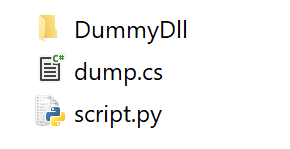
Opening dump.cs and searching for the string prefs.json quickly led me to the class containing that string. I also found a suspicious key string EK (hidden for copyright reasons).

EK is 20 bytes long; if treated as Base64, it decodes to 15 bytes. Neither fits the key length for AES, DES, or 3DES. Using it as an RC4 key to decrypt the prefs.json save file? Nope, that didn’t work either.
Analyzing il2cpp.so
Time to analyze the code logic properly. I opened libil2cpp.so in IDA, ran the generated script.py with Alt+F7, waited a bit, located the relevant function, and hit F5 to decompile, yielding readable code.

Starting from the Init function of the UserPrefs class, I found that it constructs a class for encryption and decryption. The key is “Local-” + Guid + EK. The “Local-” + Guid part happens to be the folder name where the save file is stored.
Now I had the full key, but the encryption algorithm was still unclear, so I continued analyzing the CryptoUtility::ctor() constructor.

The AesManaged and Rfc2898DeriveBytes classes here are both provided by .NET, making things clear:
- Construct the Rfc2898DeriveBytes class, using the key
save folder name + EKas the password and another string “0xa…..s” as the salt. - AesManaged defaults to AES-128-CBC, so Rfc2898DeriveBytes generates a 16-byte IV and a 16-byte Key.
- Encrypt/decrypt the save file.
Encryption/Decryption Program
Referencing a previous PHP implementation of .NET’s Rfc2898DeriveBytes class, I implemented the encryption/decryption program in the best language:
<?php

class SymmetricEncryption {
    private $cipher;
    public function __construct($cipher = 'aes-128-cbc') {
        $this->cipher = $cipher;
    }
    private function getKeySize() {
        if (preg_match("/([0-9]+)/i", $this->cipher, $matches)) {
            return $matches[1] >> 3;
        }
        return 0;
    }
    function derived($password, $salt) {
        $AESKeyLength = $this->getKeySize();
        $AESIVLength = openssl_cipher_iv_length($this->cipher);
        $pbkdf2 = hash_pbkdf2("SHA1", $password, $salt, 1000, $AESKeyLength + $AESIVLength, TRUE);
        $key = substr($pbkdf2, 0, $AESKeyLength);
        $iv =  substr($pbkdf2, $AESKeyLength, $AESIVLength);
        $derived = new stdClass();
        $derived->key = $key;
        $derived->iv = $iv;
        return $derived;
    }
    function encrypt($message, $password, $salt) {
        $derived = $this->derived($password, $salt);
        $enc = openssl_encrypt($message, $this->cipher, $derived->key, OPENSSL_RAW_DATA, $derived->iv);
        return $enc;
    }
    function decrypt($message, $password, $salt) {
        $derived = $this->derived($password, $salt);
        $dec = openssl_decrypt($message, $this->cipher, $derived->key, OPENSSL_RAW_DATA, $derived->iv);
        return $dec;
    }
}

$name = 'Local-db23521a-d1ea-2197-8640-f112c7f9ced9';
$password = $name.'8C................2l'; // Partially hidden for copyright reasons
$salt = '0x.........s';

// decrypt
$file = file_get_contents('prefs.json.encrypted');
$file = substr($file, 2); // Remove file header
$se = new SymmetricEncryption();
$decrypted = $se->decrypt($file, $password, $salt);

// encrypt
$file = file_get_contents('prefs.json');
$file = $se->encrypt($file, $password, $salt);
$encrypted = 'EN'.$file; // Add file header

Epilogue and Reflections
The perverse part of this game isn’t just encrypting the save file with Rfc2898DeriveBytes and AES. After modifying the save file and playing for a few minutes, I found the coins reset to zero.
Further analysis revealed that the game assigns an ID to every event involving coins, experience, or items. Each time an item is gained, the corresponding event ID is queued and periodically sent to the server; the same applies to item consumption. I suspect the server maintains its own item data, and if the game detects a significant discrepancy with the server’s data, it loads the server’s version. So, I had to play the game offline.
Perhaps instead of modifying the save file, disabling the code that consumes coins would be a better approach. However, modifying the .so file and repackaging the game is another story altogether.
Coxxs
This article (https://dev.moe/en/3043) is an original work by Coxxs. Please credit the original link when reposting.
One thought on “Reverse Engineering a Unity IL2CPP Game”